When you want to decorate your home, you may find it difficult to choose the right decor.
Dopamine Decor, Maximalist Decor,
Vintage Retro Decor, Organic Modern Decor, Neo Deco, Afro-Boho Decor... With so many styles to choose from, it can be hard to decide. You may find a decor piece you really like, only to realize that it doesn't match the style or atmosphere of your home. On the other hand, if you choose a decor piece in a popular style, your home may not feel very unique. After all, popular designs are often widely used, and you may find similar decorations in many other homes.
Customized decor may seem like a better option, but it can also be expensive and time-consuming. You may need to spend a lot of time communicating with designers and making revisions. Even after spending the time and money, you may still end up with a piece of decor that doesn't fully meet your expectations.
However, there is another option. In recent years, more and more AI tools have emerged, and an AI 3D model maker is one of them, offering a variety of features that make 3D creation accessible to everyone. Even if you have never worked with 3D models before, you can use these tools to create your own designs.
Here, we tested six AI 3D model generators to help you find the right tool for creating unique 3D printed home decor.
What Can You Make with AI for 3D Printed Home Decor?
With an AI 3D model generator, you can turn your ideas into personalized home decor instead of relying on ready-made designs. From practical everyday items to eye-catching decorative pieces, there are many possibilities to explore.
Popular 3D Printed Home Decor Ideas
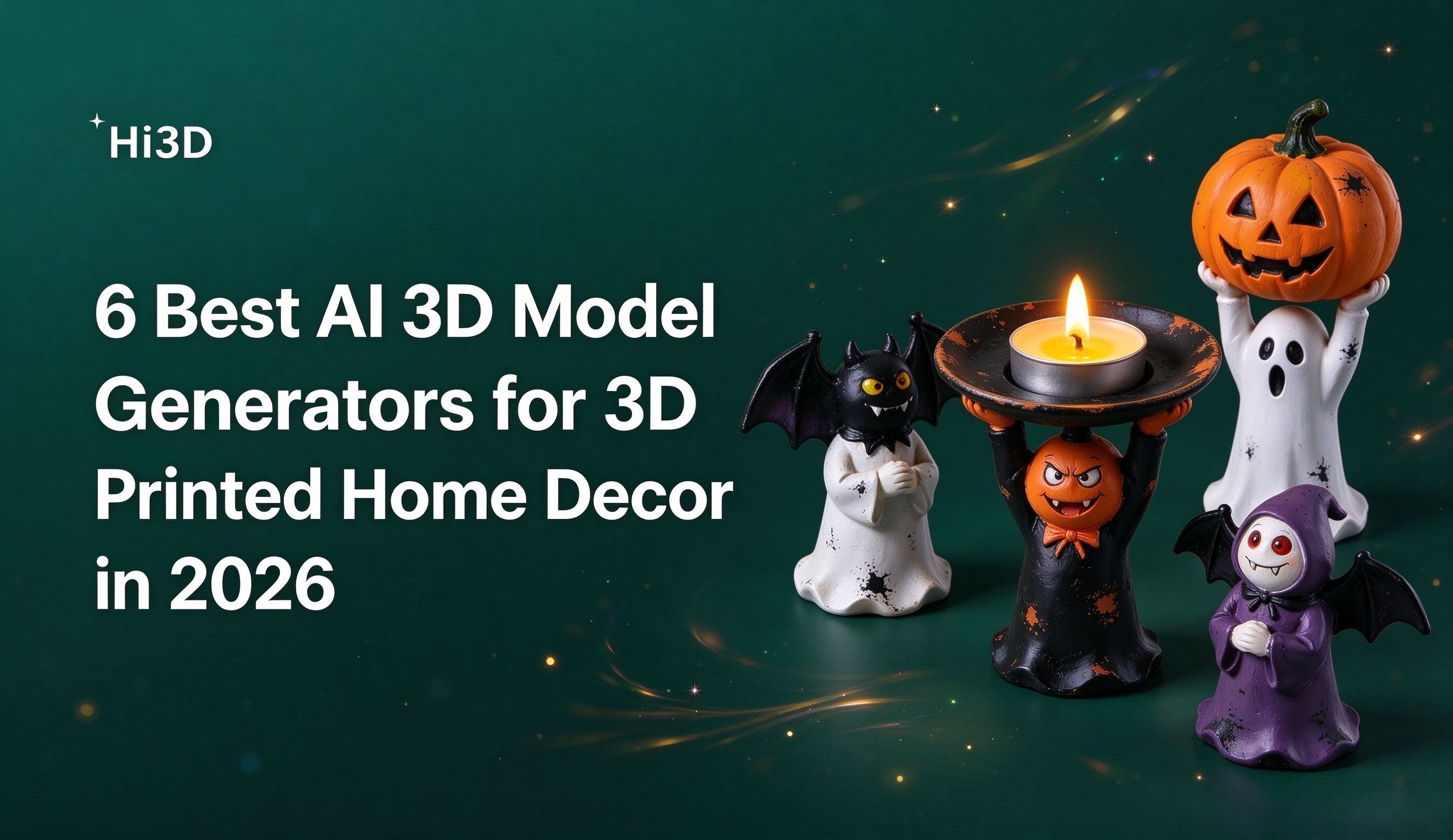
Don't limit your imagination. Door signs, flower pots, candle holders, vases, wall art, decorative sculptures, decorative boxes, lampshades, mirror frames... Many home decors you can imagine can potentially be created with a 3D printer. If you're looking for 3d print ideas for home, these projects offer plenty of inspiration for personalizing your living space.
You can customize the shape, patterns, and details based on your home's style and your personal needs. For example, if you want a vase or flower pot, you can use AI to design unique shapes, textures, and styles. If you want a candle holder or lampshade, you can use design elements such as cutouts and geometric patterns to create distinctive light and shadow effects. You can even explore 3D print wall art with intricate patterns or geometric designs to complement your interior. If you have favorite movie or game characters, you can turn your ideas into 3D sculptures, decorative figures, or small figurines with unique designs.
Beyond purely decorative pieces, AI can also help you create practical household items to 3D print, such as organizers, storage containers, and custom holders. These household 3D prints can combine functionality with personal style, making everyday objects fit your space and preferences.
In fact, you are the designer. Let AI bring your ideas to life. It can help turn even your random thoughts into something you can see and create. Remember, every 3D-printed piece of home decor can be unique because it starts with your own idea. It reflects your creativity and personal style, so you don't have to worry about ending up with the same decor as everyone else.
How to Create 3D Printed Home Decor with an AI 3D Model Generator
You may think that only professionals and hobbyists can successfully use AI 3D model generators to create 3D models. But that's far from the truth.
Many AI 3D model generators are beginner-friendly and make the process much easier than you might expect. In fact, there are only two basic steps.
Step 1: Create an image. If you already have a reference image, you can upload it and enter a description in the Text to Image section. The AI can then generate a new image based on your reference and description. If you don't have a reference image, don't worry. You can simply describe what you want and let AI generate an image for you. If you're not satisfied with the result, you can adjust your description and try again until you get an image you like.
Step 2: Turn the image into a 3D model. Upload the image to the Image to 3D section and wait a few minutes for the 3D model to be generated. Depending on your needs, you can then choose options such as Split-to-Print or Multi-Color Print.
If you already have a 3D printer, you can download the 3D model file and print it yourself. If you don't have a printer, some tools also offer 3D printing and home delivery services, allowing you to have the finished decor delivered directly to your door.
6 Best AI 3D Model Generators for 3D Printed Home Decor
Here, we tested six AI 3D model generators based on their ease of use, interface clarity, and 3D model generation quality.
How We Tested the AI 3D Model Generators
To determine whether a tool is suitable for you, we tested each one from several perspectives, including ease of use, how easy it is to find its features, the overall clarity of its interface, and the types of applications each tool is mainly designed for.
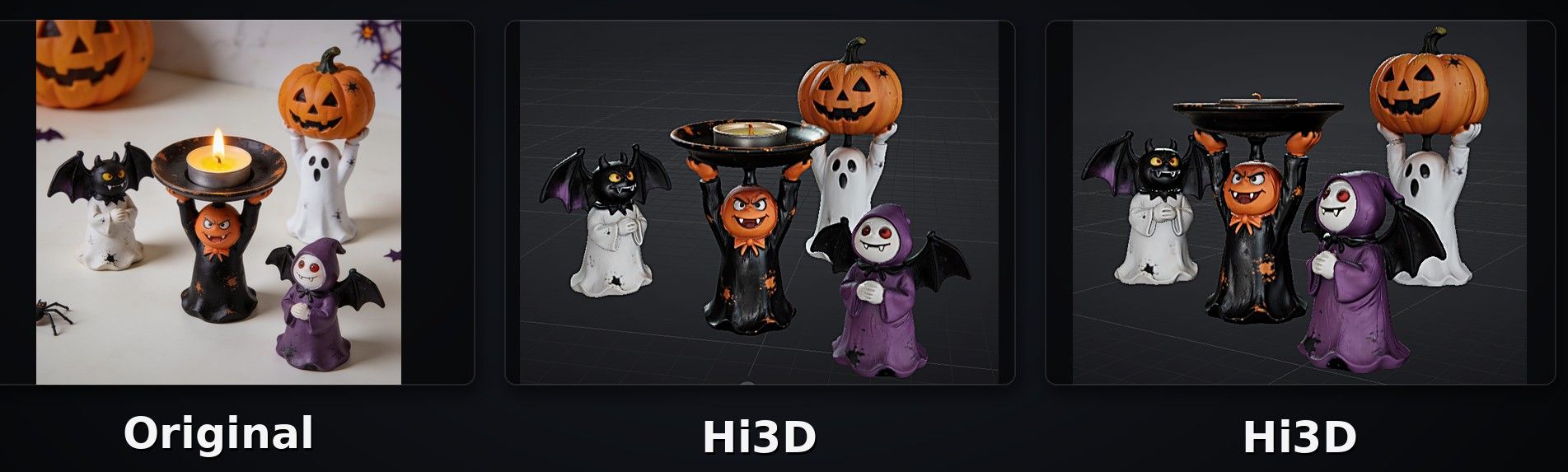
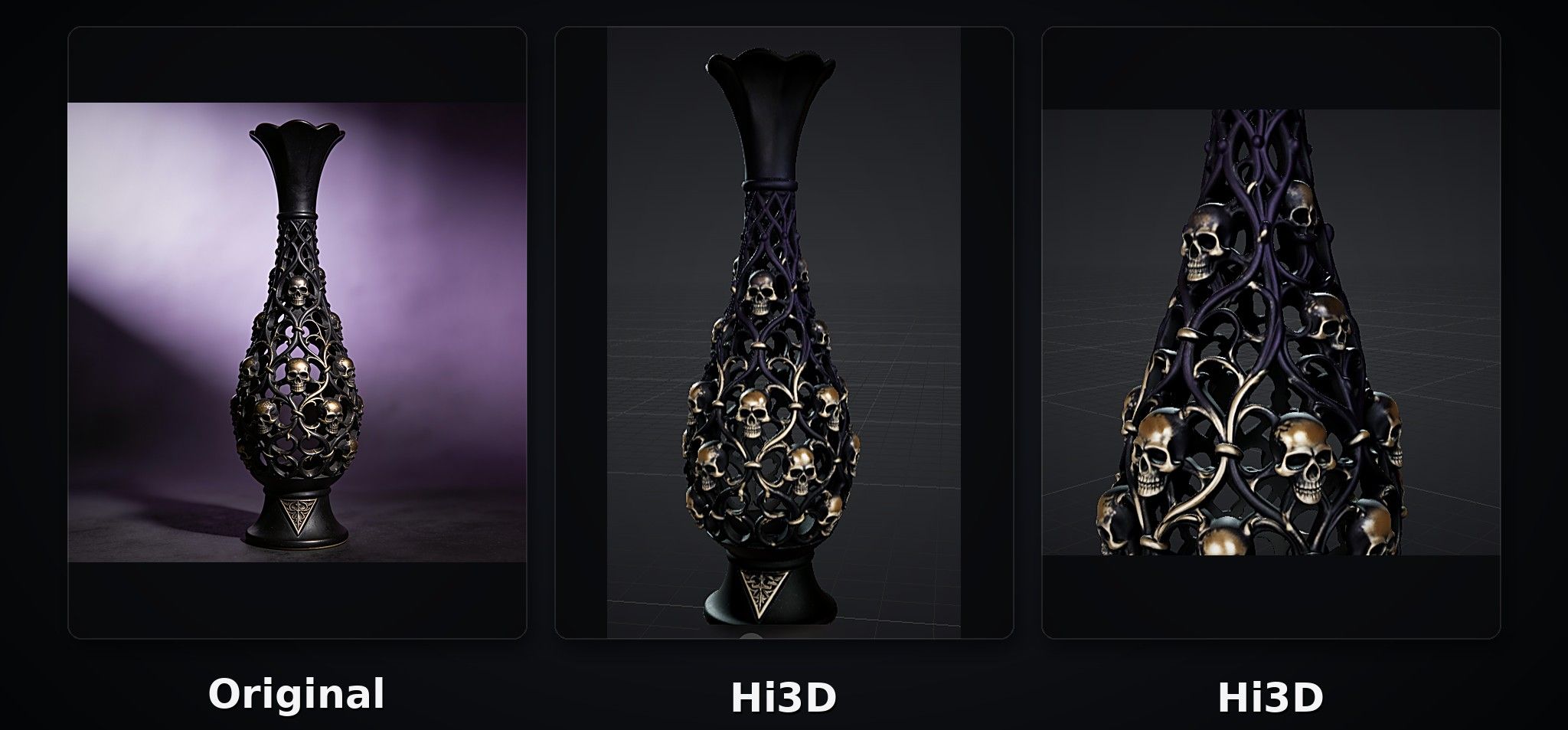
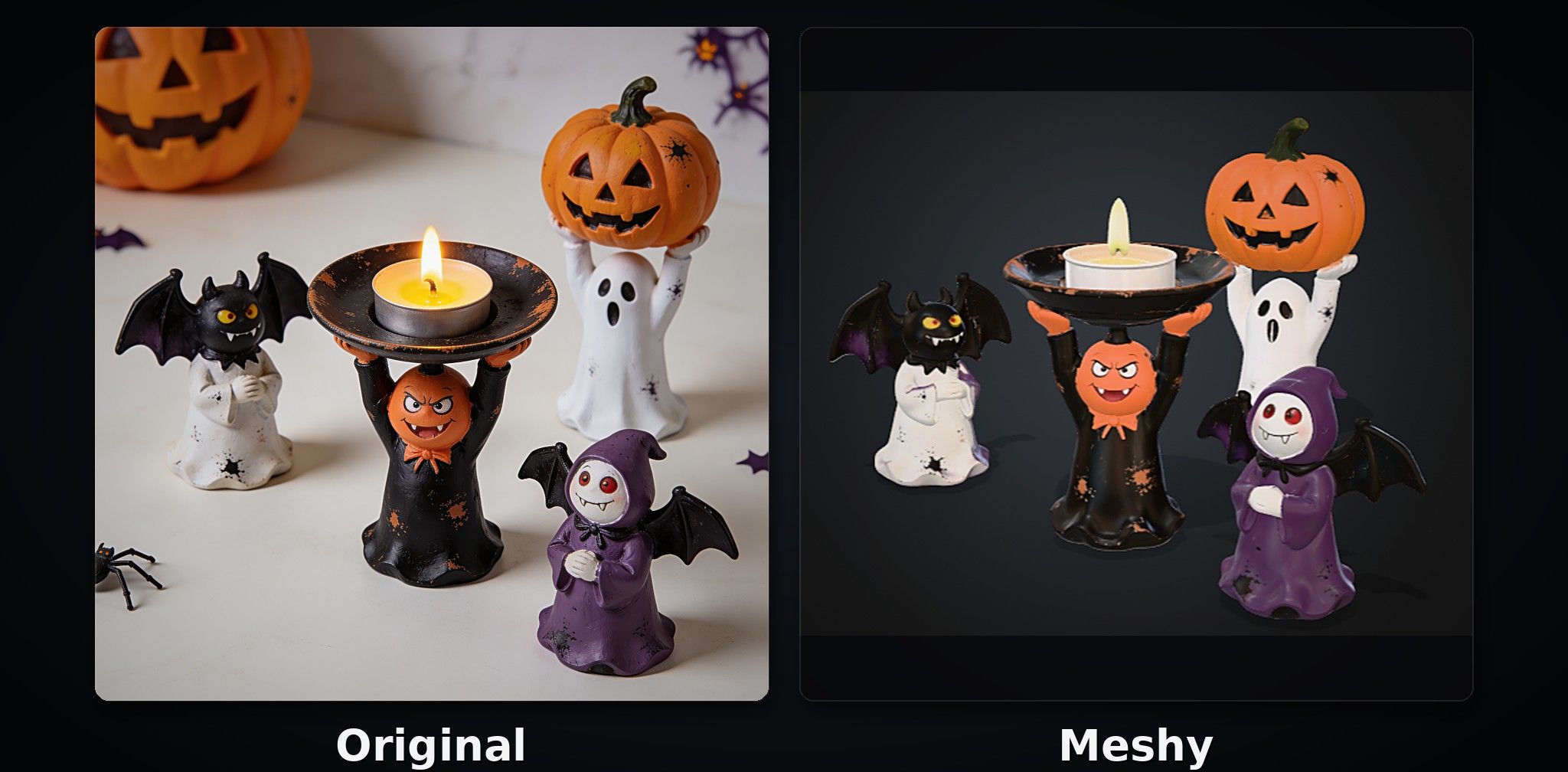
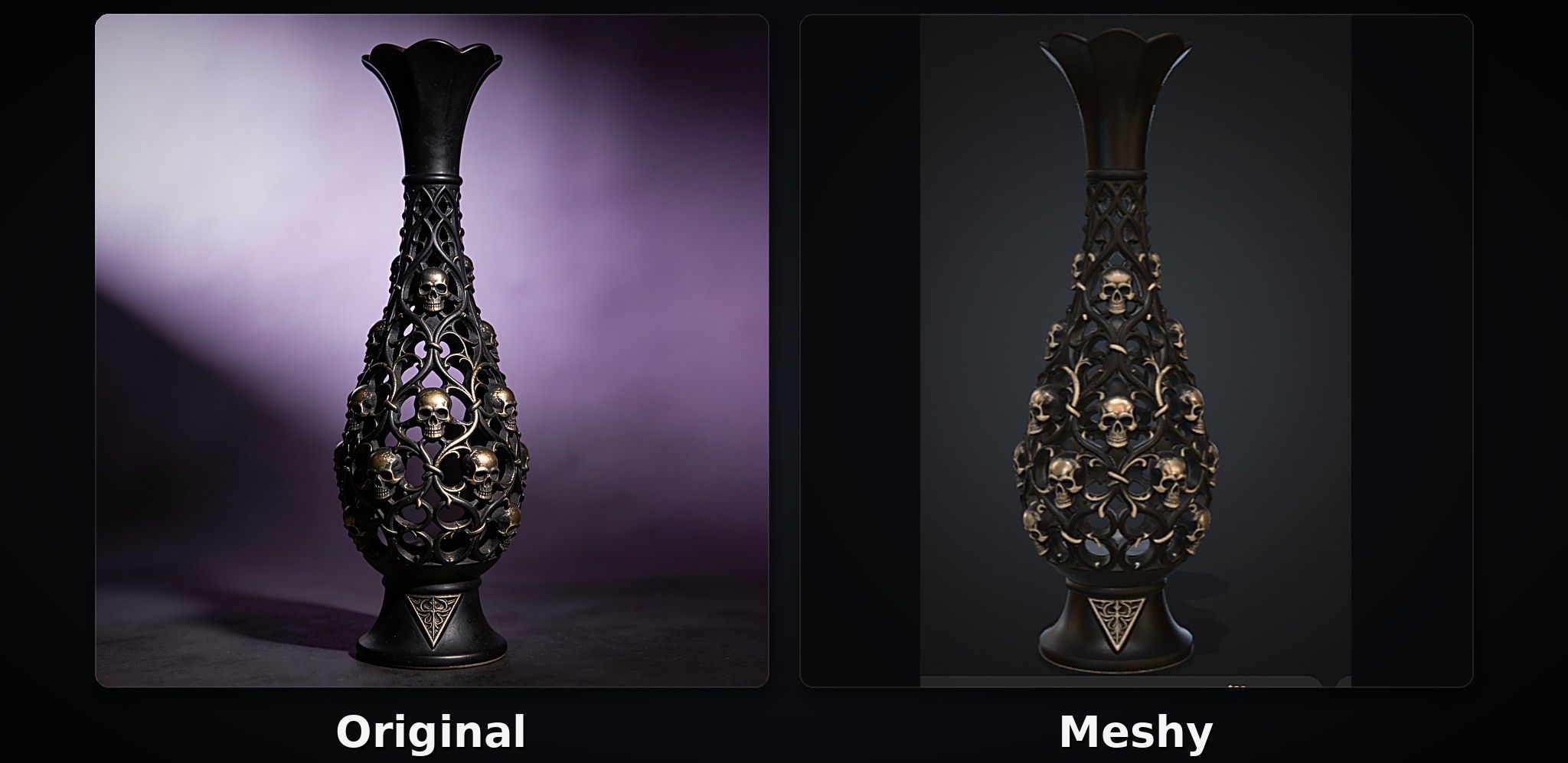
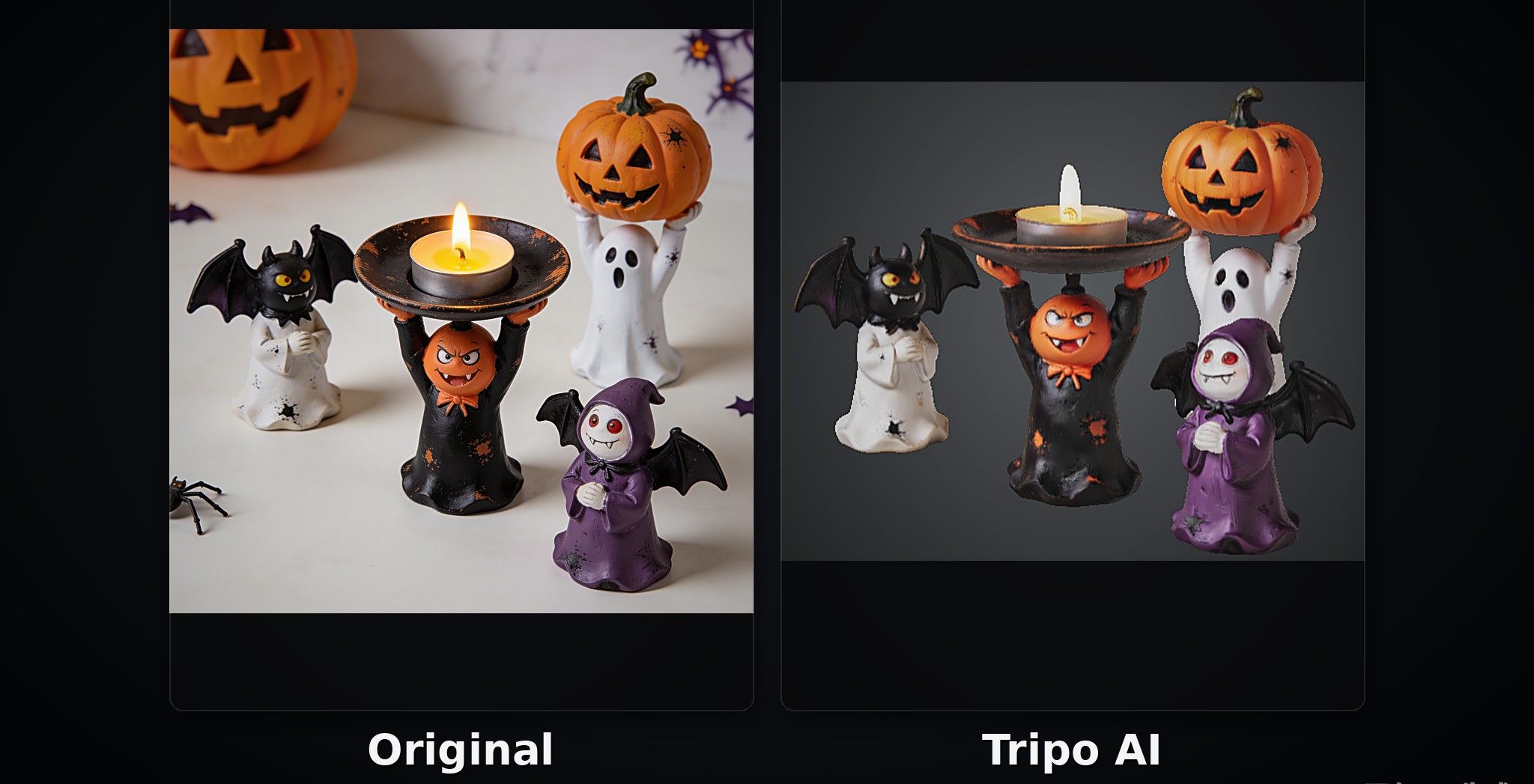
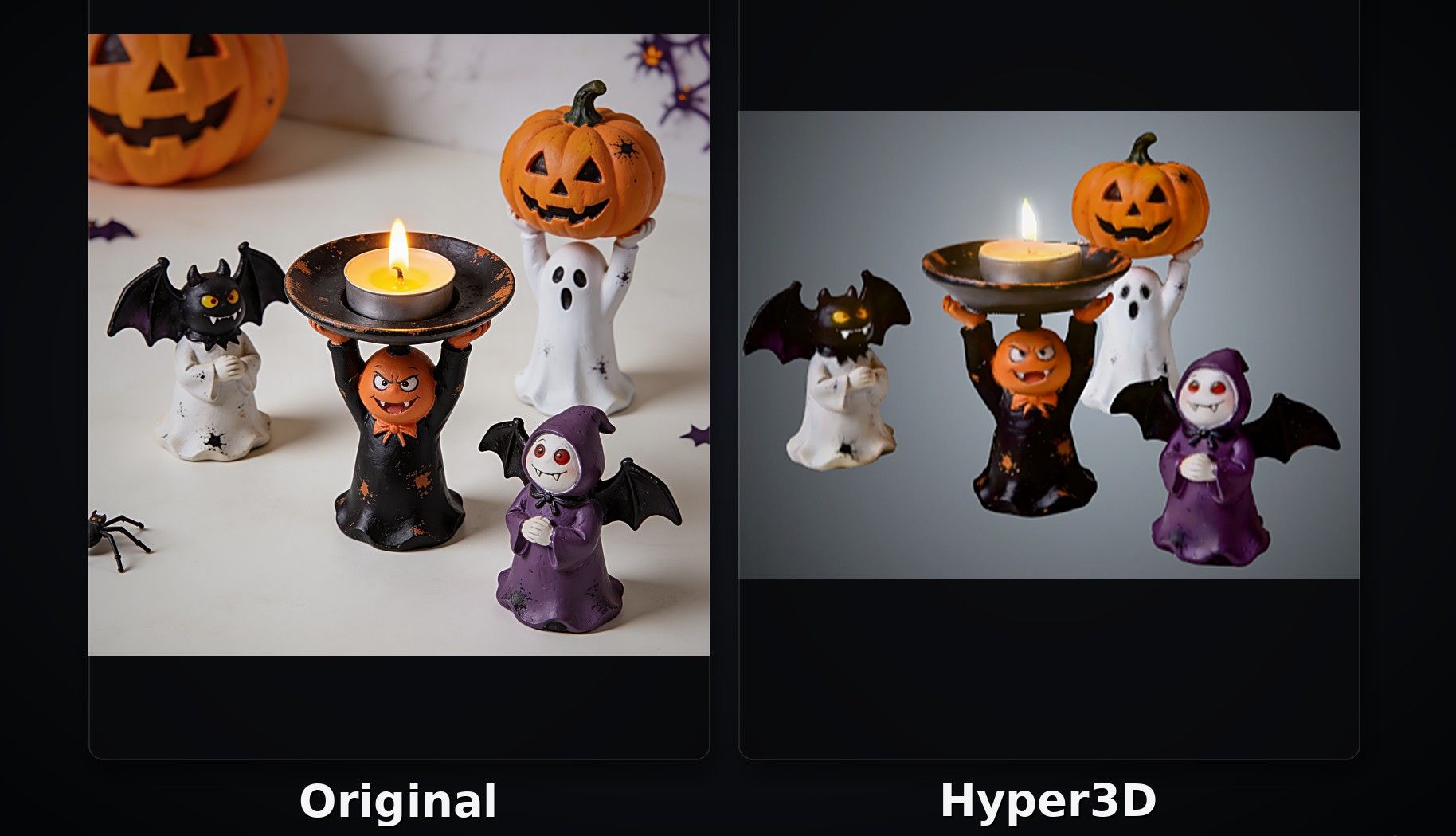
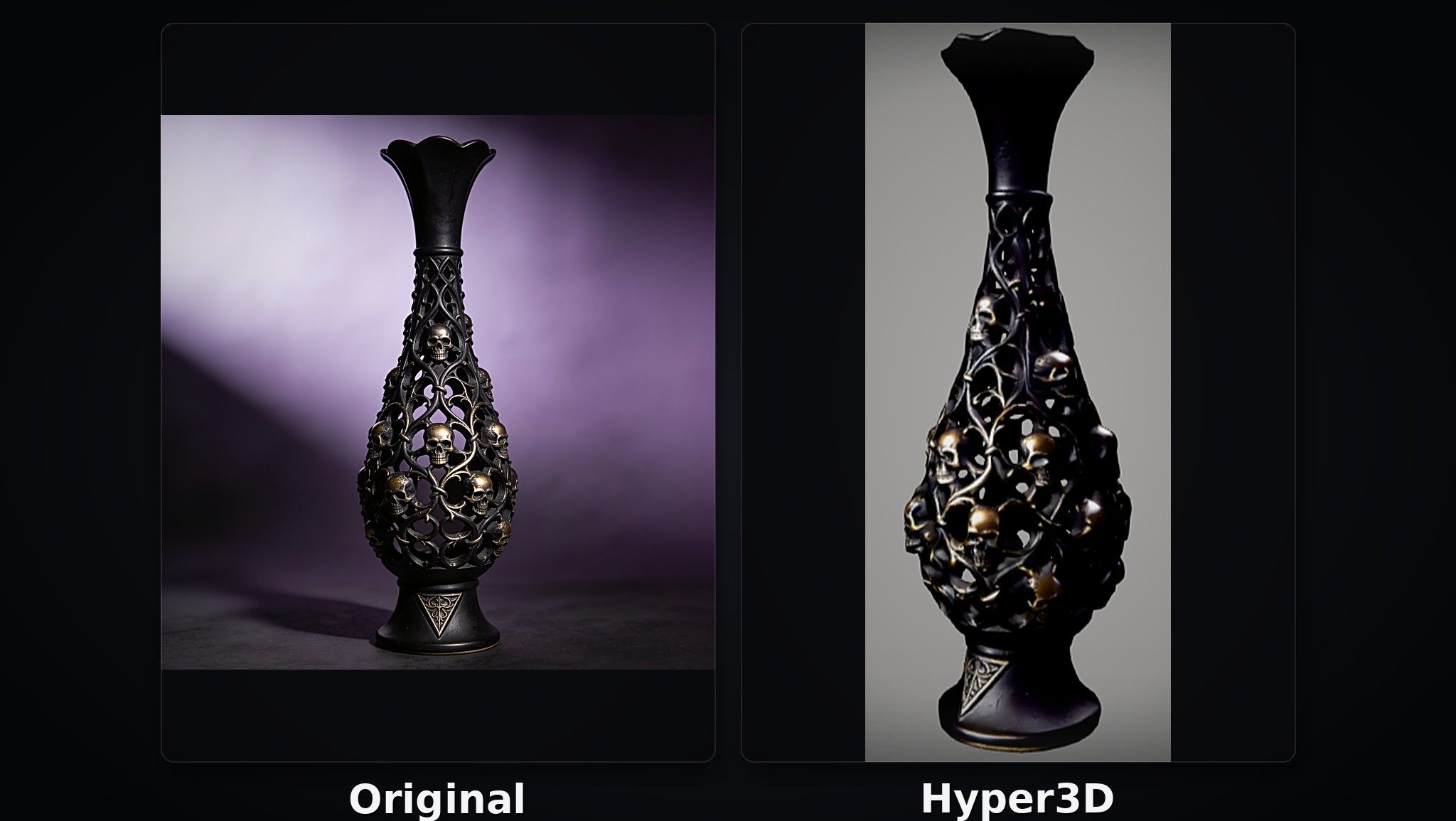
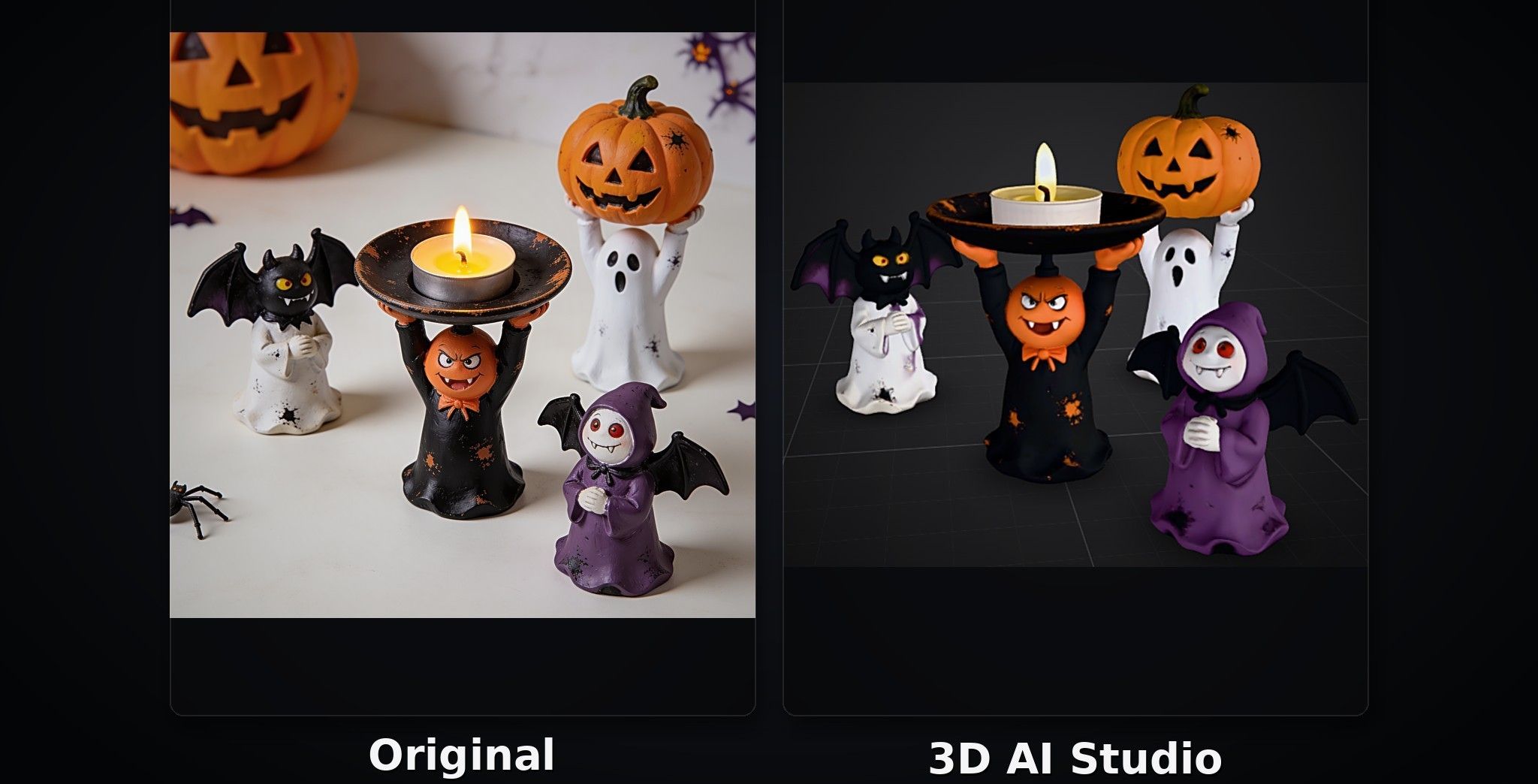
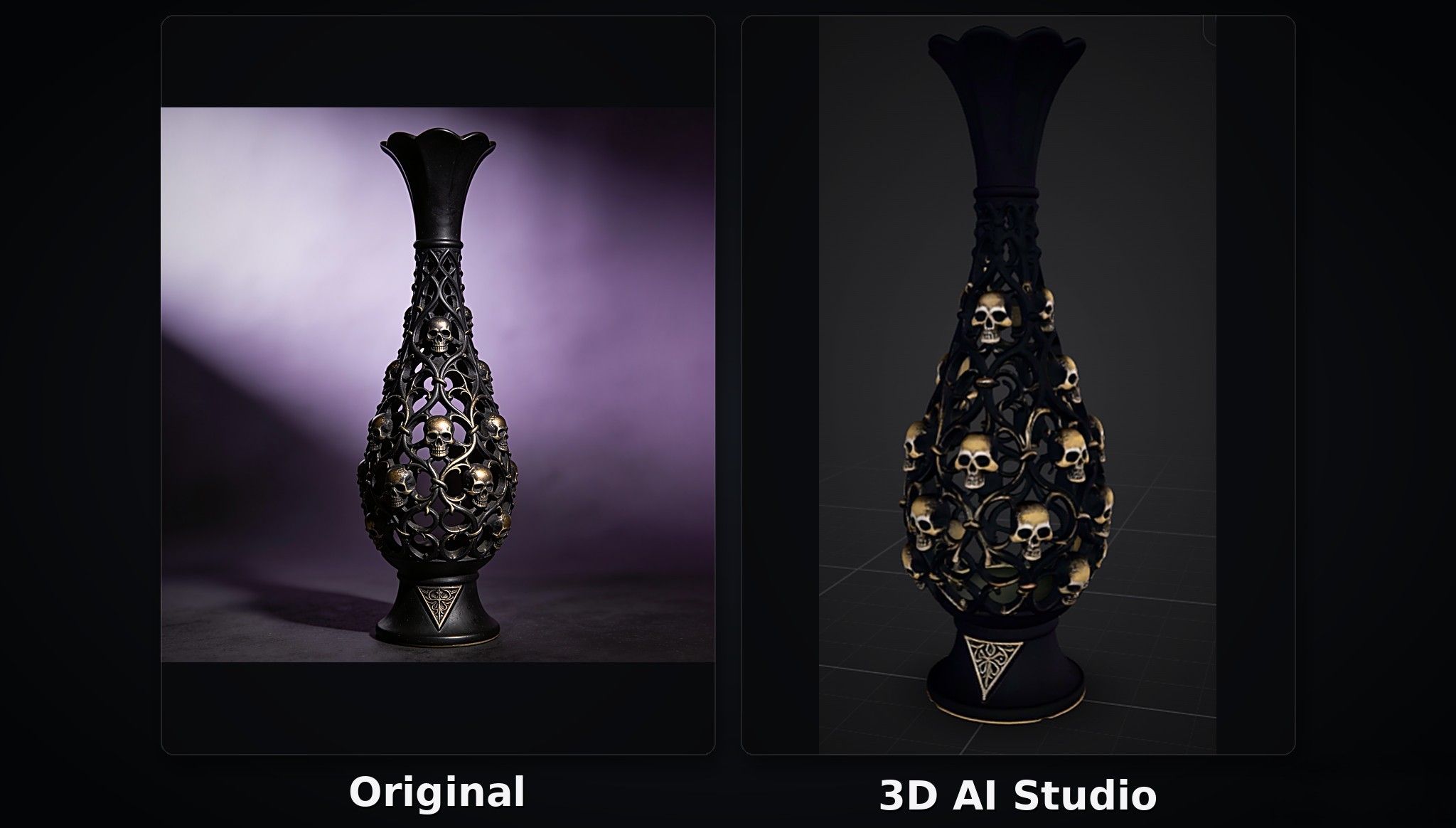
To evaluate each tool's ability to reproduce the original image, we also used every tool to generate two models: a Halloween-style candle holder and a Gothic-style vase.
Hi3D
Hi3D provides an online platform that helps users turn their ideas into physical 3D models in one place. There is no need to download any software or app; users can simply visit the website and get started. With its clear interface, Hi3D makes 3D creation more accessible to beginners. Even if you have never worked with 3D printing before, you can easily understand where to start and how to use the platform.
Hi3D has released Hi3D V3.0 , which enhances its 3D model generator's ability to reproduce details from the original image. In the Text to Image section, you can upload up to four reference images and add text descriptions to generate a new image. In the 3D Generation section, you can upload multi-view images to provide additional visual information about different sides of an object, helping the AI reconstruct surfaces that may be hidden in a single image.
Actually, Hi3D is a good choice for beginners who want to turn their ideas into 3D models without dealing with a complicated workflow.
Pros:
- Clearly organized features make it easy for beginners to get started.
- A fullscreen 360-degree viewer lets users inspect their 3D creations from every angle after generation.
- Supports up to 2048³ voxel-level geometric resolution and 8K textures, helping capture and reproduce intricate details.
- Offers 3D printing and home delivery services.
- Free registration and support for major 3D export formats.
Cons:
- New users receive 100 lifetime credits after registration rather than a recurring monthly credit allowance on the free plan.
- Subscription credits reset at the beginning of each billing cycle and do not roll over to the next one.
Price:
- Free plan: Includes 100 lifetime credits.
- Monthly plans: Pro costs $19.90/month, Max costs $39.90/month, and Ultra costs $129.90/month.
- Annual plans: The listed promotional prices are $95.52/year for Pro, $191.52/year for Max, and $623.52/year for Ultra.
Halloween-Style Candle Holder Test
For this test, we used Hi3D to generate a Halloween-style candle holder. As shown in the image below, Hi3D successfully reproduces the cute ghosts in the original image, preserving their details with impressive accuracy. In particular, the colorful speckles on the ghosts' outfits have a distinctive splatter-paint effect, and Hi3D captures this detail very well.
Another interesting difference is that the original image shows a candle with a visible flame, while the generated 3D model does not include one. This suggests that the AI can interpret the object in context and make inferences about how certain elements might translate into a 3D model, although it does not reproduce every visual detail literally.
Gothic-Style Vase Test
In the second test, we used Hi3D to generate a Gothic-style vase. As shown in the image below, the skull decorations on the vase present a particular challenge for 3D model generation. An AI-generated model may reproduce the skull on the front while failing to preserve the decorations on other sides.
Hi3D, however, successfully reproduces the skull decorations across the vase, as well as the inverted triangular patterns around its base. These details are preserved beyond the front-facing view, demonstrating Hi3D's ability to reconstruct decorative elements across different surfaces of a 3D object.
Meshy
Meshy also has a clean interface and provides a comprehensive workflow for turning ideas into 3D models. In addition to general 3D model generation, it places a stronger emphasis on animation and game development. Many professionals use Meshy to generate 3D characters for games and animation, helping reduce manual work in their workflows.
Pros:
Supports both character creation and general 3D asset generation, making it useful for game developers.
Monthly free credits are helpful for users who need to experiment with different prompts and generate multiple versions of a model.
Supports text-to-animation and video-to-animation generation.
Cons:
Its professional-oriented features and workflow may feel somewhat overwhelming for beginners.
Free users cannot download newly generated 3D models.
Price:
Free plan: 100 credits per month.
Monthly plans: Pro costs $20/month, Premium costs $40/month, and Ultra costs $100/month.
Annual plans: Pro costs $192/year, Premium costs $384/year, and Ultra costs $960/year.
Halloween-Style Candle Holder Test
As shown in the image below, Meshy generally reproduces the overall appearance of the original candle holder, but some details are less accurate. The surface texture and material appearance differ noticeably from those of the original image. For example, the orange bow ties worn by the ghosts have a raised, three-dimensional shape in the original image, but Meshy does not reproduce this feature accurately, resulting in a noticeable difference in detail.
Gothic-Style Vase Test
As shown in the image below, Meshy reproduces the overall structure of the original Gothic-style vase relatively well. However, there are still noticeable differences in surface texture and material appearance.
Tripo AI
Tripo AI is a comprehensive AI 3D model generation platform that supports Text-to-3D, Image-to-3D, and Multi-view-to-3D generation, helping users quickly turn their ideas into 3D models. It also offers features such as AI texturing, model splitting, and mesh optimization, making it suitable for a range of applications, including game asset creation, animation, and general 3D content creation. Its features are clearly organized, and each feature page includes simple tutorials to help users get started.
Pros:
Provides tutorials to help users learn how to use the platform and its features.
Offers a good balance of generation speed, visual fidelity, and production tools.
Provides 3D printing and home delivery services.
Cons:
The Max plan may be expensive for users who only create 3D models occasionally.
Price:
Free plan: $0/month, with 200 credits per month.
Pro plan: $20/month or $240/year.
Max plan: $90/month or $1,080/year.
Halloween-Style Candle Holder Test
As shown in the image below, Tripo AI reproduces many details of the original Halloween-style candle holder with impressive accuracy. For example, it captures the ghosts' bow ties and the colorful speckles on their outfits, preserving the distinctive splatter-paint effect.
Gothic-Style Vase Test
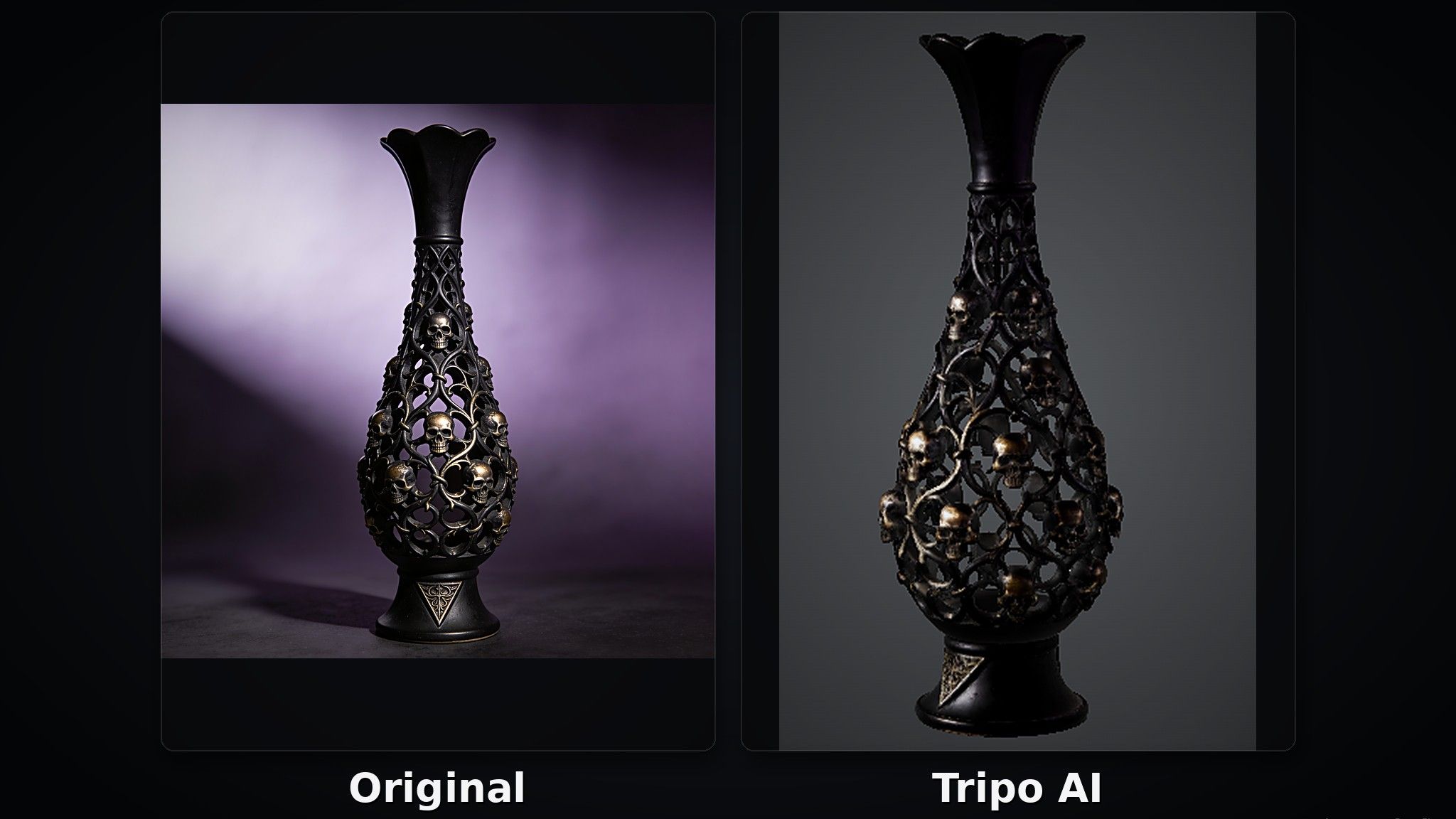
However, Tripo AI does not reproduce the Gothic-style vase as accurately. As shown in the side view below, the skull decoration on the front of the vase is colored, but the corresponding details on the back are not.
Neural4D
Neural4D is an AI 3D model generation platform that allows users to create 3D models from text descriptions, single images, or multi-view references, helping them quickly turn ideas into 3D assets. Its clean interface and clearly organized features make it easy for beginners to get started. The platform emphasizes geometric quality and supports the generation of watertight meshes, along with exports in formats such as STL. These capabilities make it suitable for 3D printing and prototyping.
Pros:
The pricing can be suitable for short-term experiments and occasional projects.
Offers a free option for downloading untextured meshes for personal use.
Cons:
Credit consumption varies depending on the generation engine and selected options, which may make it harder to estimate the cost of each generation.
Price:
Free plan: The homepage lists a free option with 50 credits per week.
Go plan: $9.90 for the first month, then $19.90/month.
Plus plan: $19.90 for the first month, then $39.90/month.
Pro plan: $49.90 for the first month, then $99.90/month.
Halloween-Style Candle Holder Test
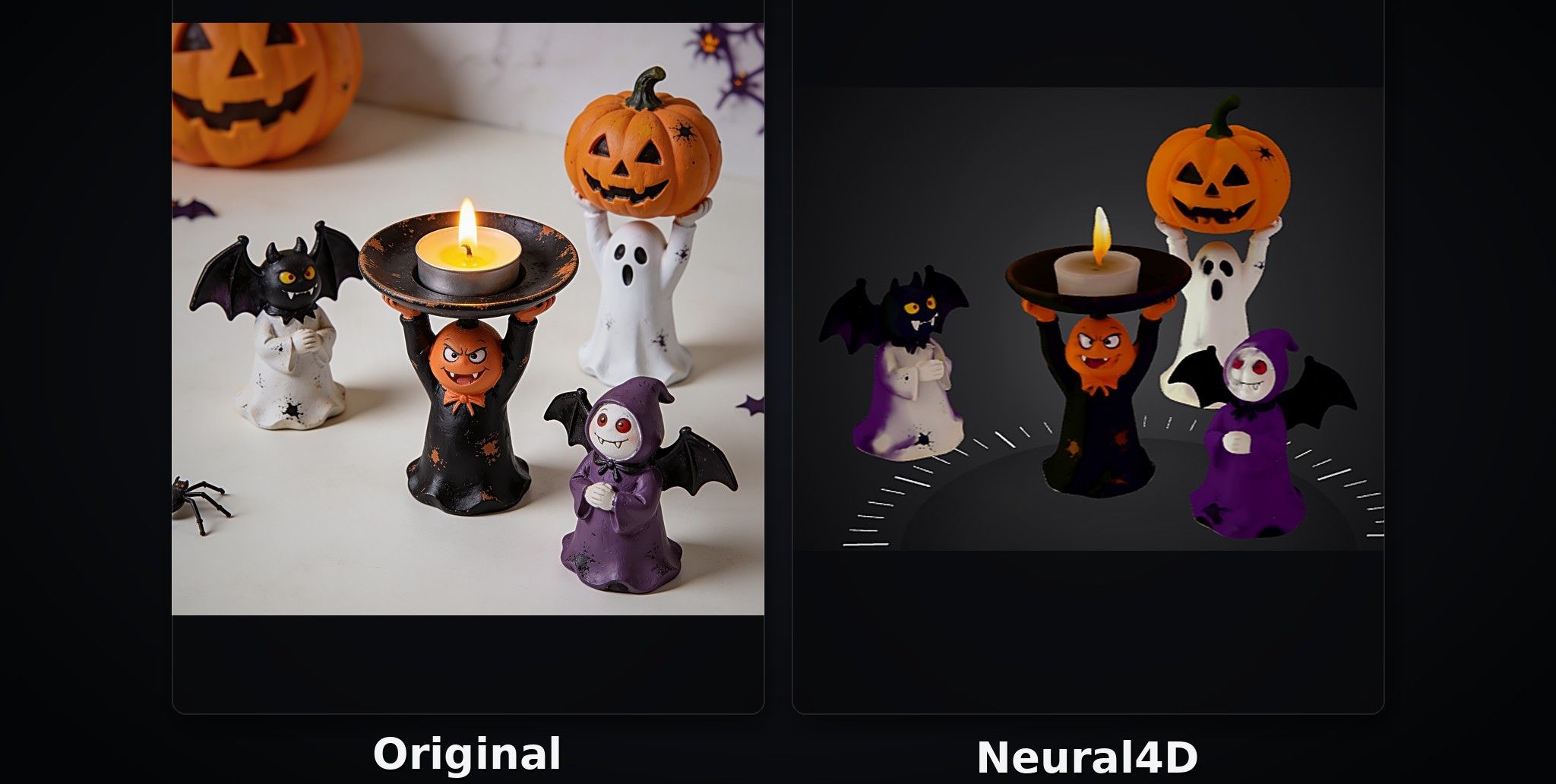
As shown in the image below, Neural4D does not perform particularly well in this test. Both the surface appearance and color reproduction differ noticeably from the original image.
Gothic-Style Vase Test
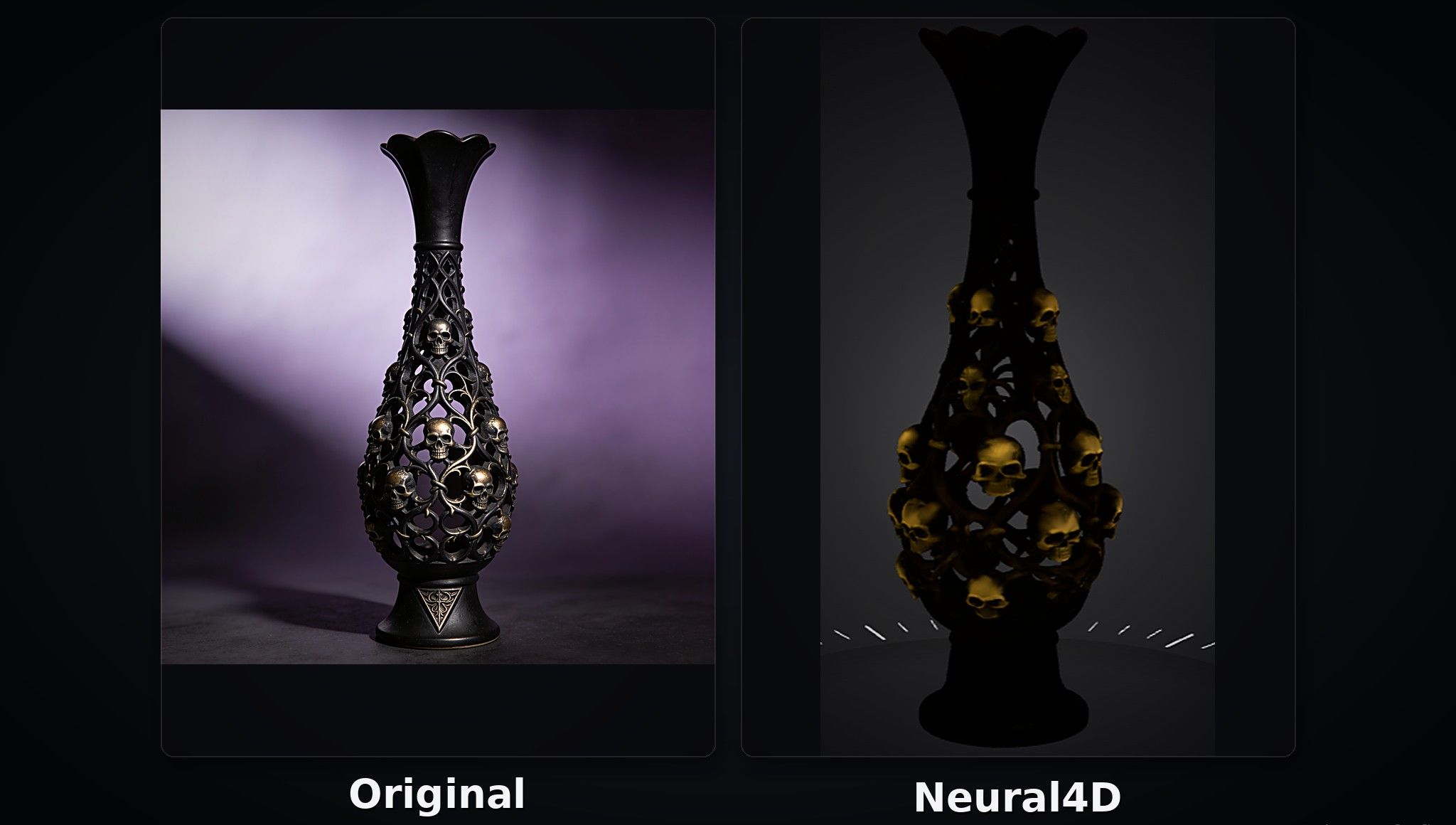
As shown in the image below, Neural4D also struggles to reproduce the original Gothic-style vase accurately.
Hyper3D
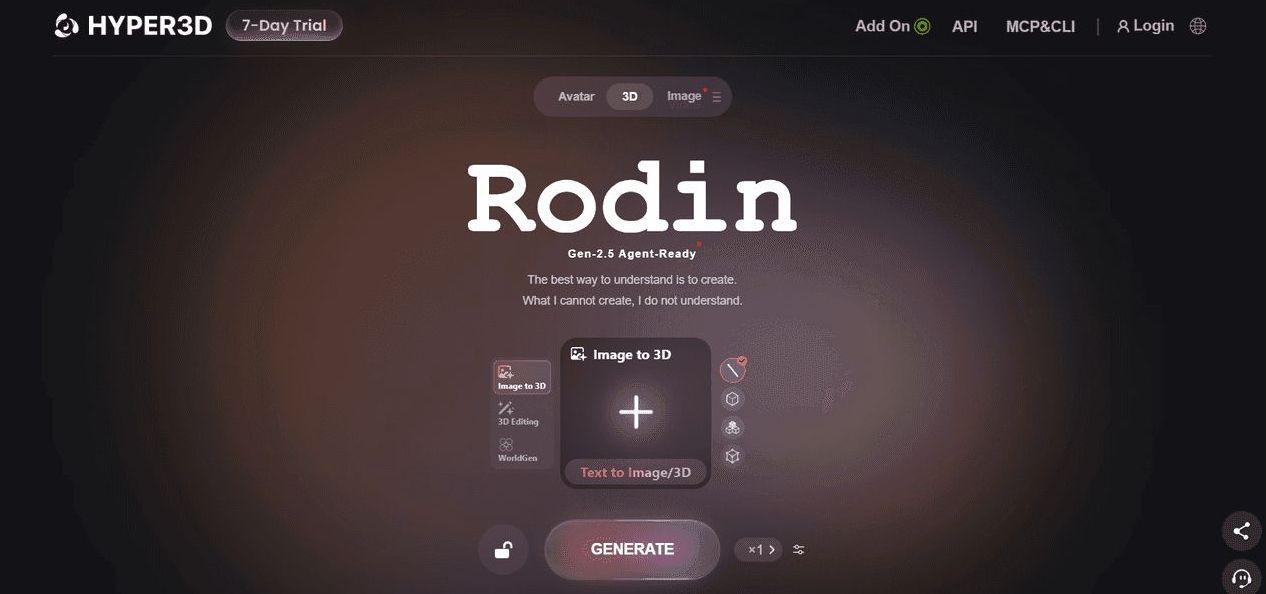
Hyper3D's core product, Rodin, supports high-quality 3D model generation from text prompts, single images, and multi-view reference images. It also offers features such as AI texturing, localized editing, and polygon reduction, allowing users to further refine and optimize their models.
Pros:
Supports multi-image input, which can provide additional visual information about hidden or overlapping structures.
Creator and Business plans include private assets and broad usage rights.
Cons:
The workspace does not occupy the full screen, and the interface can be less intuitive than those of some competing tools.
Some features and advanced options may require a learning curve, especially for beginners
Price:
Free plan: $0, with 5 lifetime credits.
Direct credit purchases: $1.50 per credit.
Creator plan: $30/month or $288/year.
Business and Enterprise plans: Business costs $120/month or $1,152/year, while Enterprise pricing is customized.
Halloween-Style Candle Holder Test
Overall, Hyper3D reproduces the original image reasonably well, though some fine details and surface textures are less accurate.
Gothic-Style Vase Test
Hyper3D captures the vase's overall design reasonably well, but the skull decorations have noticeable color differences.
3D AI Studio
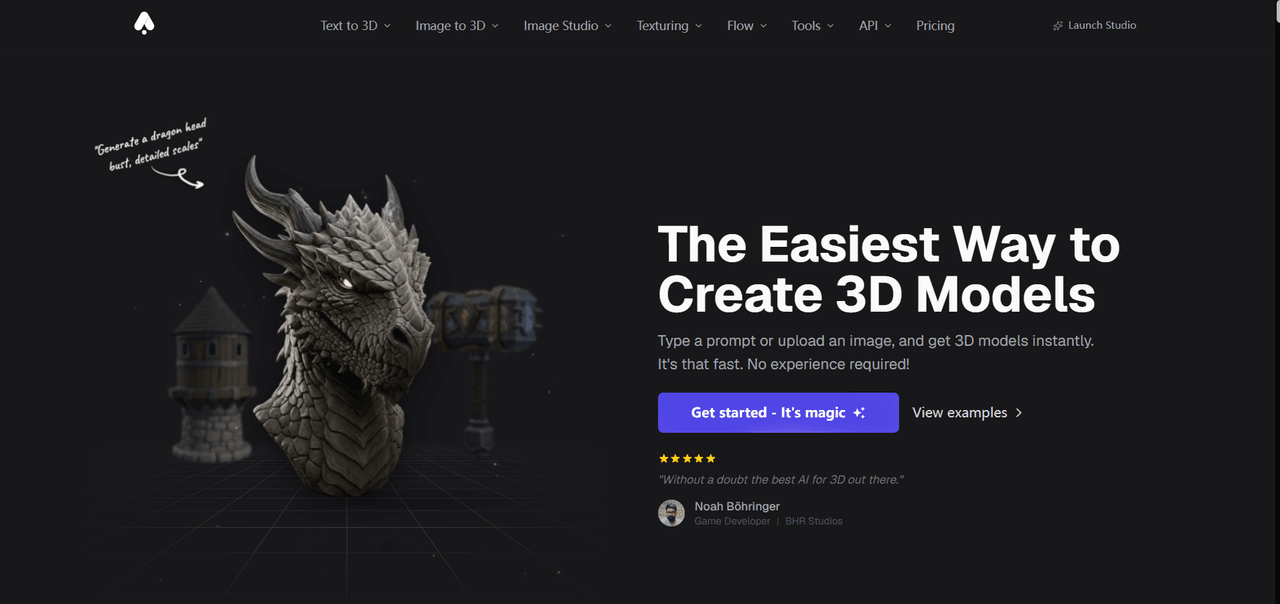
3D AI Studio combines AI texturing, remeshing, model repair, and other tools in one platform. It supports common 3D file formats, including STL, 3MF, and OBJ, making it useful for 3D printing and other creative workflows.
Pros:
Includes remeshing, repair, texturing, splitting, and workflow automation.
Supports multiple common 3D file formats.
Cons:
More complicated than a focused upload-and-generate tool.
The Pro tier is expensive for a solo user.
Price:
Signup credits: New users receive signup credits to try the platform.
Monthly plans: Basic costs $19/month, Studio costs $29/month (listed as reduced from $39), and Pro costs $149/month.
Annual plans: Basic costs $144/year, Studio costs $276/year, and Pro costs $1,668/year.
Halloween-Style Candle Holder Test
As shown below, 3D AI Studio reproduces the candle holder well, capturing its overall shape and details.
Gothic-Style Vase Test
The vase result is rougher, with less refined details and surface quality.
FAQs About 3D Printed Home Decor
What Are the Best Things to 3D Print for Home Decor?
Popular 3D-printed home decor items include vases, flower pots, wall art, sculptures, lampshades, and practical storage accessories. Vases are a popular choice, with spiral textures, geometric shapes, and asymmetrical designs adding a modern touch to living rooms and bedrooms. Pair them with dried or artificial flowers for a stylish look. Wall art is another great option for decorating blank walls. Lampshades and moon lamps can also create soft lighting effects through cutout designs or translucent materials.
What Is the Best Material for 3D Printed Home Decor?
For most indoor 3D printed home decor, PLA (polylactic acid) is usually the most suitable material. It is easy to print, relatively affordable, and available in a wide range of colors and finishes. This makes it ideal for vases, sculptures, wall art, decorative figures, and decorative boxes, allowing you to create intricate textures and complex shapes.
However, PLA has limited heat resistance and is not suitable for prolonged exposure to high temperatures. For decor that needs to withstand moisture, such as bathroom decorations or flower pots, PETG is a better choice thanks to its good moisture resistance, toughness, and chemical resistance.
For outdoor decorations that need to withstand prolonged sunlight and changing weather conditions, ASA is worth considering because of its excellent UV resistance and weatherability.